
How Checks work
Compass compares every figure in an AI draft with the books before the draft reaches you, and compares your sources with the books on every sync. Checks run on plain arithmetic with no AI involved, so they keep running when your AI usage runs out.
Last updated
What a check is
A check is a yes-or-no test written in arithmetic. It asks one question, such as whether a figure matches the books, whether two sources agree, or whether a source synced on time.
Compass runs two kinds. Answer checks look at the figures inside AI output: assistant replies, report tiles, workflow drafts, skill findings, forecasts and Knowledge. Data checks look at your data itself, every time it syncs. All of them live on the Checks page: open the Memory menu and choose Checks.
Where you see checks
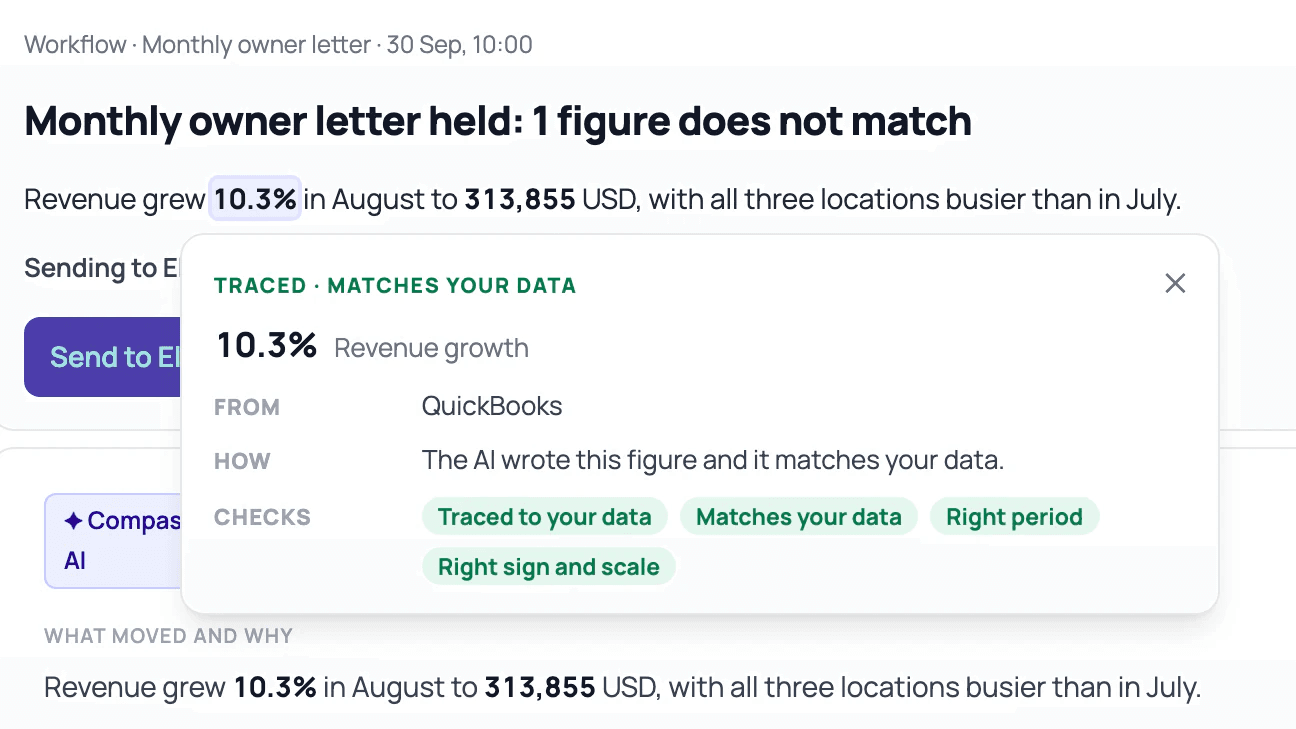
Assistant replies, workflow drafts, skill findings and forecasts carry a line that sums up their checks, and a What Ran link that lists each check that ran. Turn on Show Checks to see the marks on the figures themselves. Select a figure to open its check card, for example Traced · matches your data or Does not match.
A finished owner letter might read 2 figures · 2 traced · 4 checks passed. The checks sit beside each figure, so you see what was compared before you sign.
The ten built-in checks
Ten checks come built in. Each one has an On switch, a version, settings and a history.
| Check | Kind | What it looks at |
|---|---|---|
| Traced to your data | Answer | The figure comes from rows Compass can point to. |
| Matches your data | Answer | The figure equals the number Compass works out from the books. |
| Right period | Answer | The figure belongs to the period the sentence names. |
| Right sign and scale | Answer | Positive and negative are the right way round, and the units are right: thousands, millions, percent. |
| The math adds up | Answer | Totals, differences and percentages in the text follow from the figures beside them. |
| Same as the standard number | Answer | A figure named as a standard number, such as runway or gross margin, uses this client's definition of it. |
| Estimates are marked | Answer | A forecast or estimate is written as one, with a word such as about or expected, and never as a settled fact. |
| Sources are up to date | Data | Each source synced within its expected window. |
| The books hold together | Data | The balance sheet balances, balances carry forward, totals match their parts, and nothing is added up that shouldn't be. |
| Data arrives complete | Data | No missing months, no month counted twice, no dates in the future, and partial months are marked. |
Settings on an answer check choose where it runs: Assistant chat, Report tiles, Workflows, Skills, Forecasting and Knowledge. On Workflows, you also choose what a catch does: Rewrite once, then hold the send or Rewrite once, then mark it. On Sources are up to date, settings set the expected window for each source.
Your own checks: agreements and rules
Your own checks sit in the same list as the built-in ones, under the Yours filter, in two kinds.
- An agreement says two numbers from your data must agree, such as Card payments match sales or Bank balance matches the books. Compass offers eight common pairs to start from. This is how Compass compares Stripe, Square payout files and bank files that state a balance with the books, every time new data lands.
- A rule is a plain statement about the books: a floor, a ceiling, never negative, a month-on-month change, or a ratio that stays in a range. Rules use the same definitions as your Calculated numbers.
Add a check
- On the Checks page, choose
Add a Check. - Describe the check in a sentence, for example cash stays above 50,000, and send it. The check builds on the right.
- Adjust it by talking (lower it to 40k) or with the Fine-tune fields.
- Read the 12-month strip, which shows how the check would have read on your own numbers.
- Turn it on.
If the check needs data Compass doesn't have yet, Compass offers to connect a source, import a file or enter the figure manually, or you can choose Turn On and Wait for Data. A waiting check holds no sends and files no Inbox items, and it starts by itself when the data arrives.
When a check fails
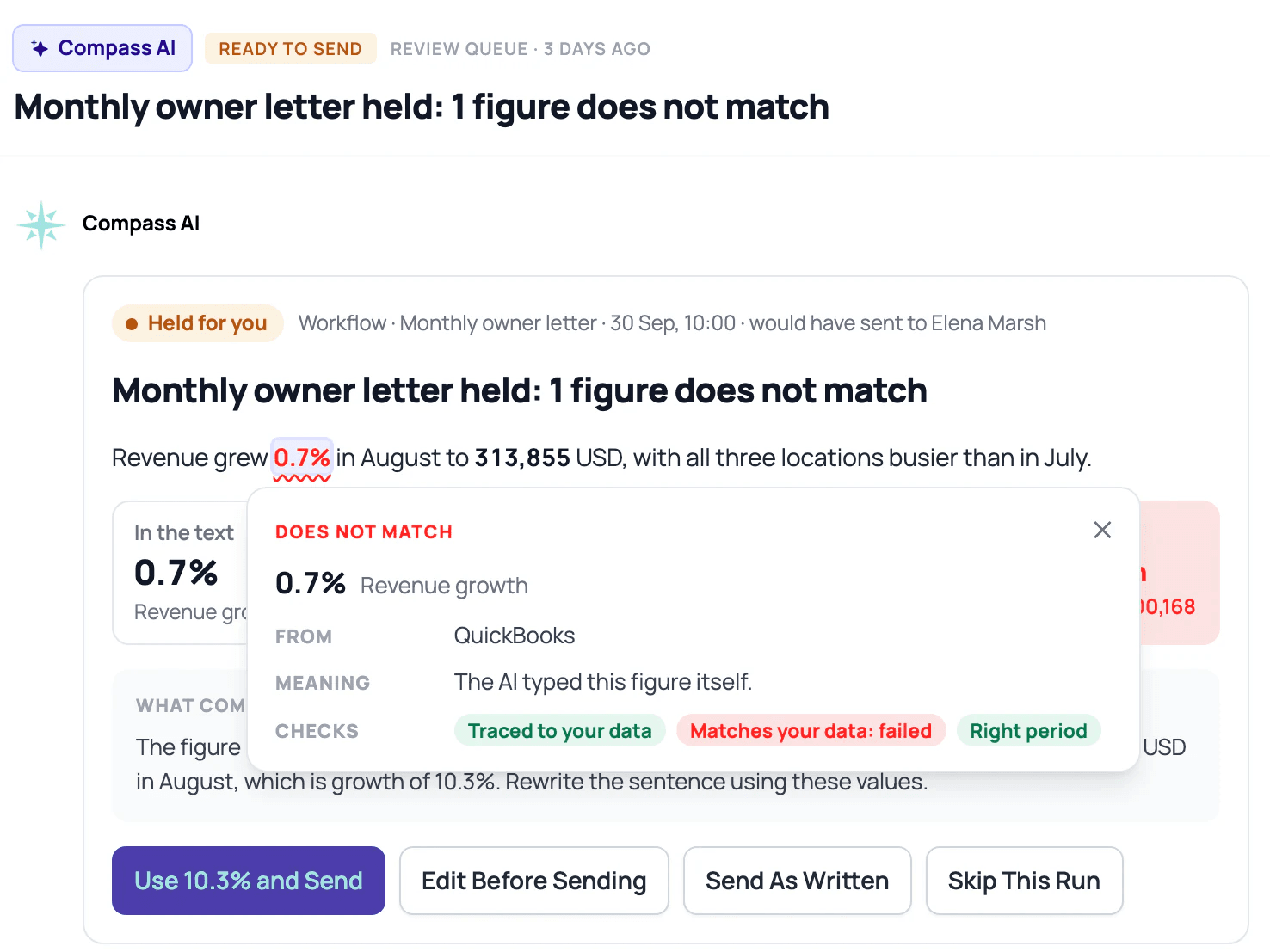
In an AI draft. When a figure in a workflow draft doesn't match the books, Compass rewrites the draft once. If the figure still doesn't match, a workflow set to send on its own falls back to approval for that run: the draft waits for you with the figure flagged, or goes out marked if you chose Rewrite once, then mark it. On a held draft you can use the correct figure, edit it, send it as written with a reason, or skip it. A workflow that already waits for approval reaches you as usual.
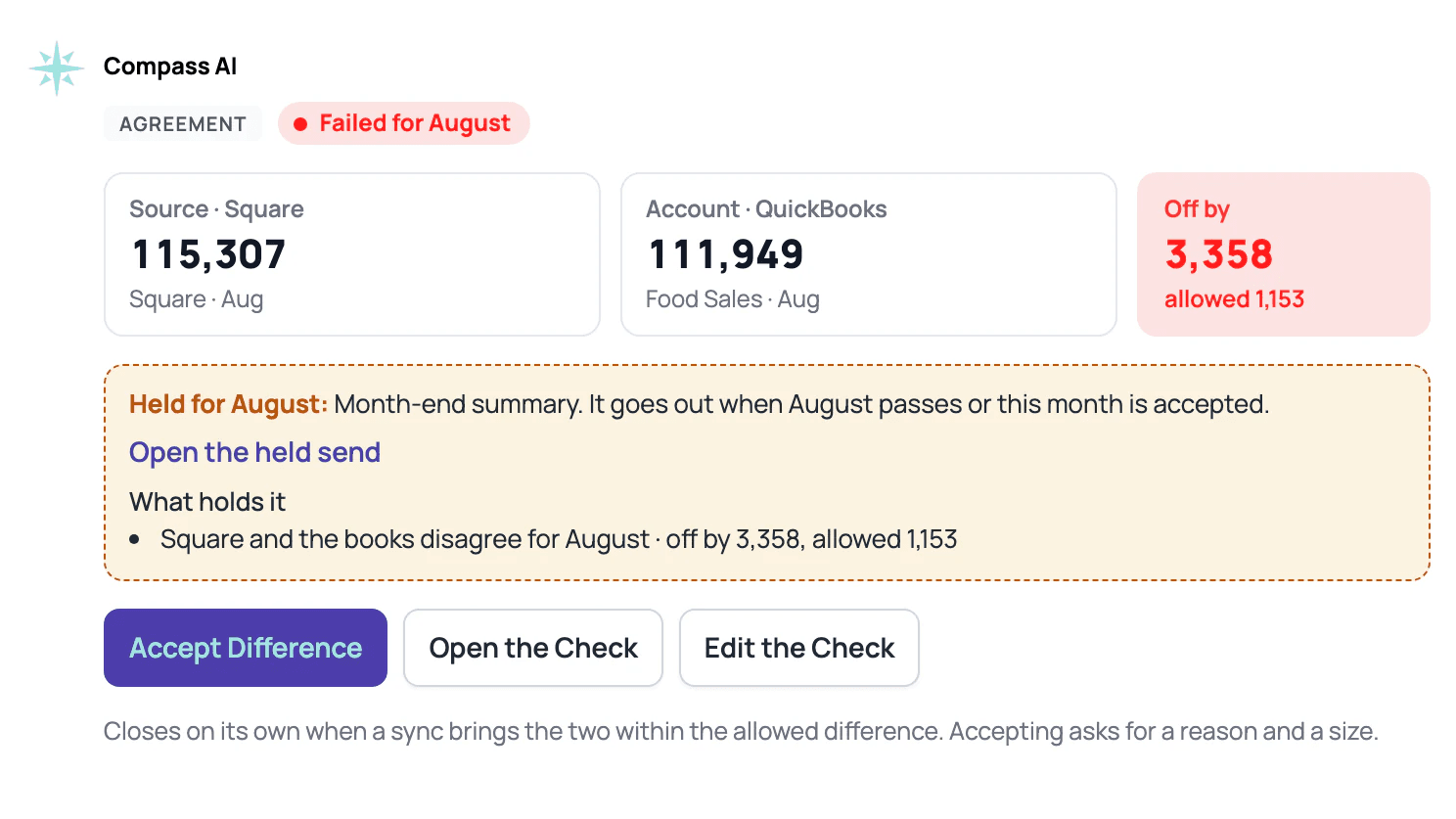
In your data. A failing agreement or rule files one Inbox item for each failing month, and a failing data check files one for each source and month. A failing month holds that month's sends from workflows set to send on their own. For example, if Square and the books are $3,358 apart, the month-end summary waits. Fix the books and the check passes, or accept the difference: Accept for {Month} on a rule, with a reason, or Accept Difference on an agreement, with a reason and the size you accept from that month on. A send held only on data goes out by itself once its month clears, as long as that happens within 30 days and the workflow still sends on its own.
Results
| Result | Meaning |
|---|---|
| Passed | The check ran and everything agreed. |
| Failed | The check ran and found a mismatch. The Inbox item says where. |
| Could not run | The check could not run, and says why. |
| Needs attention | A number the check compares has gone, for example a removed or merged account. |
| Accepted | Someone accepted the difference for that month, with a reason on the record. |
| Waiting for data | The check is on and waiting for the data it needs. |
| Off | The check is switched off. |
| Not used yet | The check is on, and nothing has run through it yet. |
Answer checks also show Caught N · last {date} for the past 30 days. Most catches link to the exact output, scrolled to the figure with its card open. Catches in Knowledge carry no link. The Checks page keeps the history of every run.
Checks across clients
In the Portfolio Hub, firm checks live under Templates > Checks. Pick an agreement from the eight common pairs, see how it reads on five clients, then send it to all clients, a segment or the clients you choose. Each copy stays linked to the firm version, so a change reaches every client. The firm can turn a check off for one client, with a reason, and the This month column shows how each check stands across clients.
Checks in Claude and ChatGPT
When Claude or ChatGPT reads numbers through Compass, each answer carries the company's data checks for that period, and the AI can ask for a summary of the built-in data checks. Its reads land in Activity under the AI's name. See Connect Compass to Claude.
Who can see and change checks
Admins can edit checks, Viewers can see them, and the Client role doesn't see them. A custom role sets Checks on its own in Settings > Roles. Every change to a check, and every acceptance, is recorded in Activity.
What Checks can't do
- A figure Compass can't trace says Not traced. It hasn't been compared with the books, so treat it as unchecked.
- A check that can't run says why. A check waiting for data holds nothing.
- Month-end balances are checked for QuickBooks books only.
- A report tile built by AI shows one check line, on the standard number, and a tile's figure doesn't open a check card yet.
- Checks test arithmetic and sources. Whether the advice is right stays your judgment.
AI usage
Checks run with no AI and keep running when your AI usage reaches 100%. Two things use AI usage: each message you type in Add a Check, and the one rewrite after a catch, which counts toward the workflow or skill that wrote the draft. Chips, Fine-tune fields and the 12-month strip use none.
Troubleshooting
A workflow didn't send. A check held it. Open the Inbox item, then fix the figure or the data, or accept the difference with a reason.
A check says Waiting for data. It needs a source Compass doesn't have yet. Connect it, import a file or enter the figure manually.
A figure says Not traced. Compass couldn't find the rows behind it. Check it by hand before you send.
Anything else. Write to support@compassapp.ai with the check's name and the month.
Frequently asked questions
Does Compass use AI to check AI?
Checks run on plain arithmetic, with no AI involved. Compass works out each number from your data and compares it with the figure in the draft, so the model that wrote the draft plays no part in the check. AI usage applies only to the messages you type in Add a Check and to the one rewrite after a catch.
How is a check different from asking the AI to double-check?
A second pass by the same model reads the same context, so it tends to repeat a wrong choice of source, period or basis. A check compares the figure with the books using a fixed definition, and it gives the same result every time it runs. Read why we check AI's numbers without AI.
Are figures from Claude or ChatGPT checked?
When Claude or ChatGPT reads numbers through Compass, each answer carries the company's data checks for that period, so the AI knows whether the data underneath agreed. The sentences your AI writes in its own window are outside what Compass can check, and so are figures it works out from data it didn't read through Compass. Its reads land in Activity under the AI's name.
If a figure matches the books, are the books right?
A match means the figure agrees with the books, so a mistake in the books themselves can still pass. Data checks and agreements catch some of those, such as a bank file or Stripe that disagrees with the ledger, or a source that stopped syncing. Your usual review of the books still applies.
Do Checks work without QuickBooks?
Yes. Checks work with whatever data you've saved in Compass: an accounting connection, app sources such as Stripe or Square, imported files and figures you enter manually. The month-end balance check needs QuickBooks books, and a check that needs data you don't have yet waits for it.
Which plans include Checks?
Checks are on every plan, including the 14-day trial. Checks shared across clients need the Portfolio plan, which costs $99 a month for the hub plus $19 per client company (as of October 2026). See pricing.