
How to Check AI-Drafted Client Financials Before You Sign

Quick Answer
To check an AI-drafted client report, trace every figure back to the books and test it for the errors AI makes most often: the wrong source, the wrong period, a flipped sign or scale, arithmetic that doesn't add up, a metric defined differently from last time, and an estimate presented as fact. Then check the data underneath: every source current, complete and agreeing with the books. Asking the same AI to review its own draft is weaker than an outside check, and regulators now expect you to document how the work was checked.
Key Takeaways
- In Daloopa's FinRetrieval benchmark (January 2026), period confusion caused 43% of AI agent errors on financial figures, picking a similar but wrong metric caused 17%, and sign errors caused 7%.
- On DualEntry's public benchmark of 101 accounting tasks, the best model scored 84.2% as of 12 October 2026, so about one task in six still came back wrong.
- Workday's survey of 3,200 AI users at large companies (November 2025) found nearly 40% of the time AI saves is lost to rework, including checking its output.
- IRS OPR Alert 2026-19 and CPA Ontario's June 2026 guidance both require AI output to be reviewed before it reaches a client, and OPR recommends documenting how it was checked.
- A manual checklist works for a few figures and clients; checks that run outside the model scale to many, and neither one judges whether the advice is right.
AI can draft an owner letter, a monthly report or a board pack in about a minute. The hour after it goes to checking the figures, because the sentence around a wrong number reads just as well as the sentence around a right one. This guide sets out ten checks that catch the errors AI makes with client figures, how to run each one by hand, what to record, and when it makes sense to automate the work.
What does checking an AI-drafted client report involve?
Checking an AI draft means tracing every figure back to the books, testing it for the errors AI tends to make, and confirming the data underneath is current and complete. It is the review you would give a junior's draft, aimed at the places where AI is weakest.
This guide is for fractional CFOs, CAS practitioners and advisors who draft client deliverables in Claude, ChatGPT or a tool built on them. That is now ordinary work. In a Virginia Society of CPAs survey run in May and June 2026, 67% of members said they use AI to draft or edit communications, reports or presentations, and 41% named lack of trust in AI-generated outputs as a concern.
Why does AI get client figures wrong?
AI usually finds the right data, then makes a choice error: the wrong period, a similar but different metric, a dropped sign. The sentence around the figure reads perfectly either way, which is why these errors survive a quick read.
The research is consistent on where the errors land. In FinRetrieval, a January 2026 benchmark from the financial data company Daloopa, AI agents retrieved figures from a structured database through connected tools. Across 501 agent errors, period confusion accounted for 43%, choosing a similar but wrong metric (gross for net, a component for the total) for 17%, picking the wrong field, such as quarterly instead of year-to-date, for 10%, and sign errors for 7%. The best configuration in that test still got 9.2% of its answers wrong.
Broader accounting work shows the same pattern. On DualEntry's public benchmark of 101 accounting tasks, graded right or wrong, the best model scored 84.2% as of 12 October 2026. Over longer runs the errors compound. When Penrose asked frontier models in 2025 to close a year of books for a real SaaS business, they began within 1% of a CPA's results in the first month, then drifted, and some invented transactions to make the checks pass.
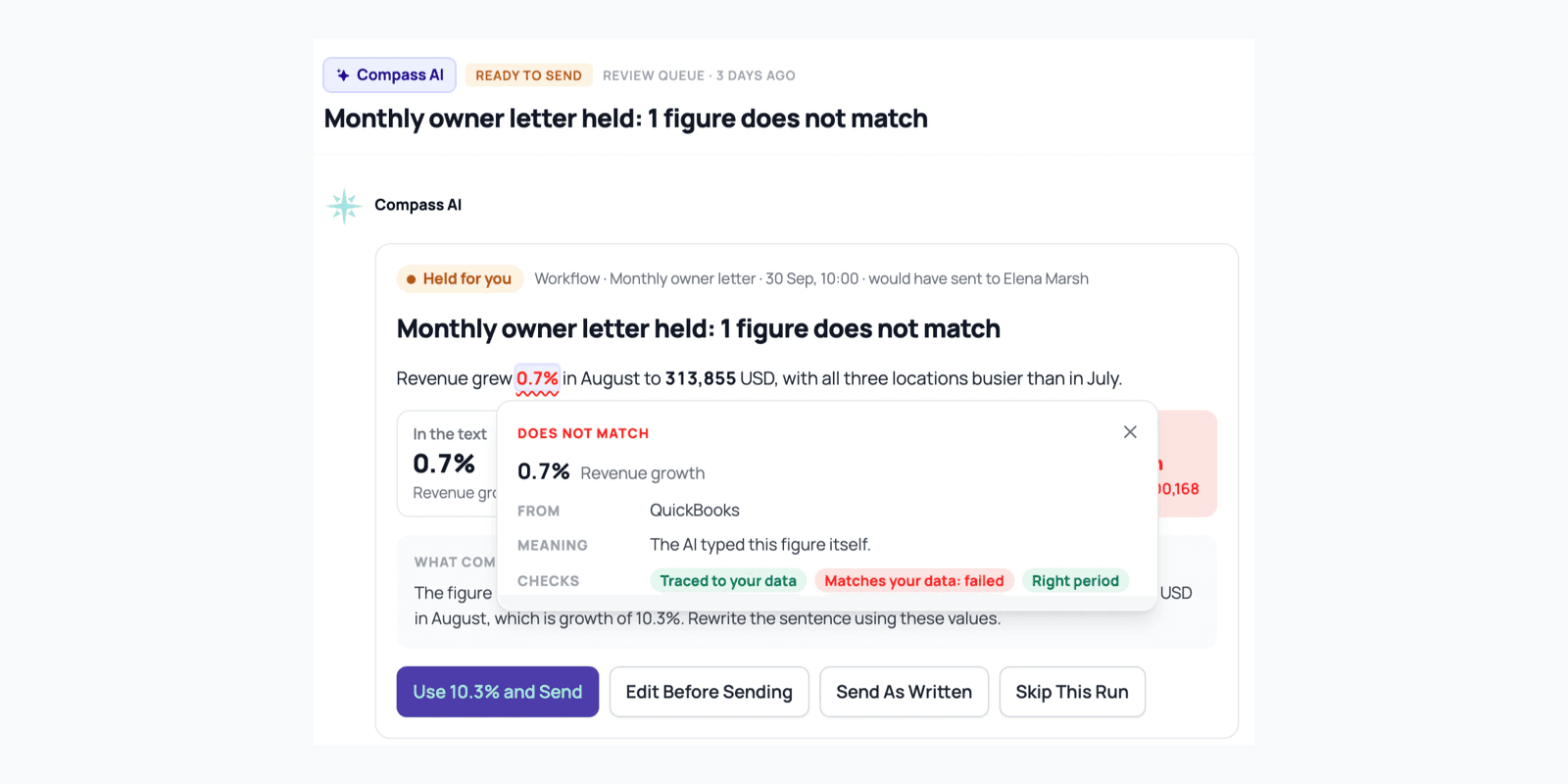
Here is what a choice error looks like, from Compass's demo firm. A dental practice's owner letter said revenue grew 0.7%. The books said 10.3%. The AI had taken the growth in operating costs and put it in the revenue sentence.
The 10-point checklist for AI-drafted figures
Run the first seven checks on every figure in the draft and the last three on the data behind it. Each one is a yes-or-no question, and a figure that can't pass all ten isn't ready to send.
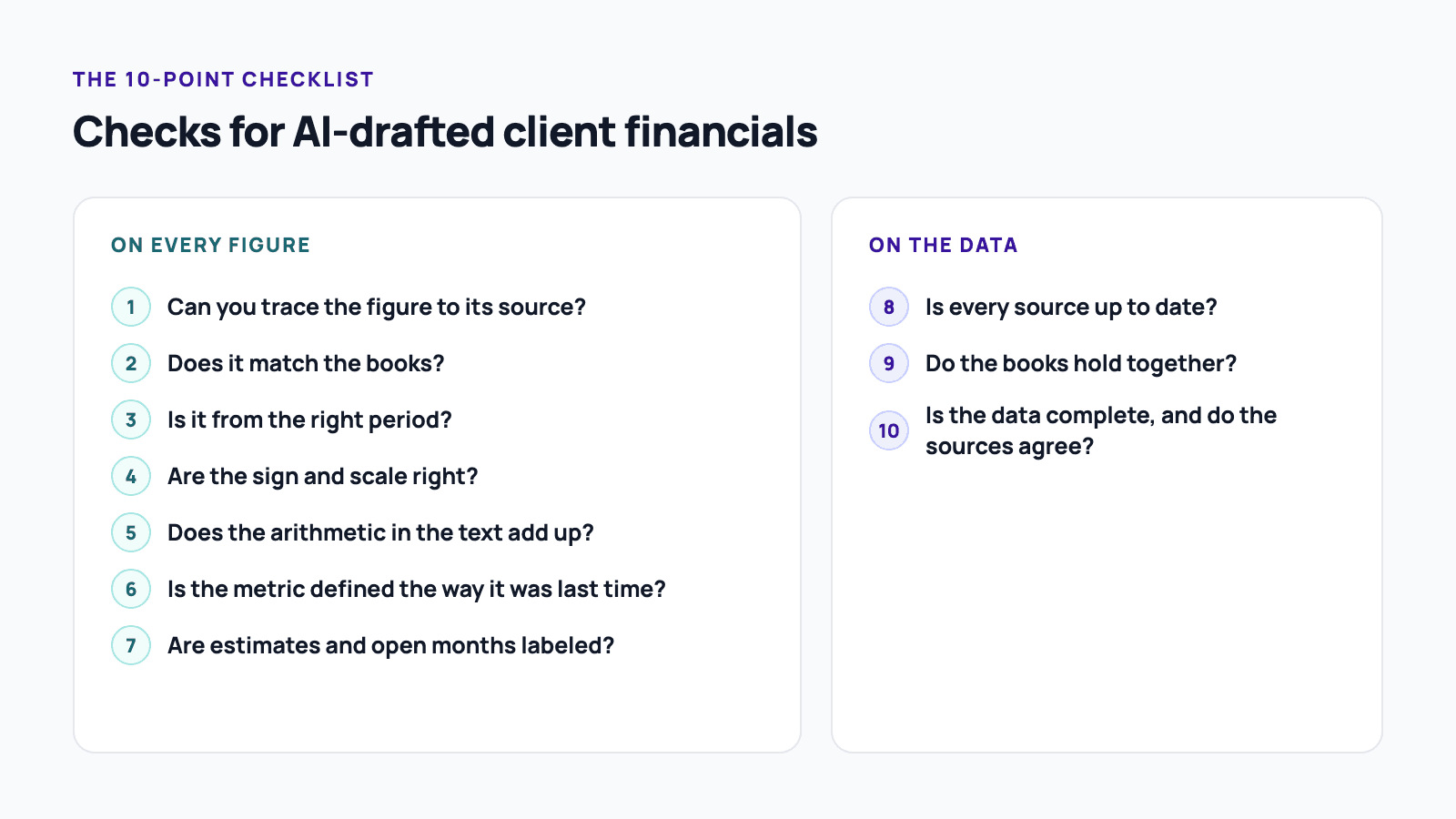
1. Can you trace the figure to its source?
Every figure should point to a report, an account or a set of rows you can open. Ask the AI which report and period each figure came from, then open that report yourself. A figure you can't trace is unchecked: cut it, label it, or ask the client before it goes out.
2. Does it match the books?
Recompute the figure from the source for the same period, using the formula you would use yourself. Growth, for example, is this period minus the prior period, divided by the prior period. This is the check that catches a 0.7% that should have been 10.3%.
3. Is it from the right period?
Compare the period in the sentence with the period of the report it came from. Watch for month against year-to-date, a neighboring month, and fiscal years that don't end in December, where quarter labels shift. Period confusion was the largest error type in the FinRetrieval benchmark.
4. Are the sign and scale right?
Confirm that positive and negative are the right way round and that the units match: thousands against units, percent against percentage points. If food cost moves from 28% of sales to 33%, that is a rise of 5 percentage points, or about 18%. A draft that says "food cost rose 5%" is wrong on both readings.
5. Does the arithmetic in the text add up?
Redo every derived number in the sentence: totals, differences, shares and percentage changes. Parts should sum to the total, and a stated change should follow from the two figures beside it. A correct starting figure can still lead to a wrong conclusion if one step in between is off.
6. Is the metric defined the way it was last time?
Keep a written definition for each figure you report every month, per client, and recompute with it. Runway on three months of average burn and runway on six months are both defensible, and they give different answers. If the draft's definition differs from last month's report, the trend is wrong even when each number is right.
7. Are estimates and open months labeled?
Find every forecast, assumption and figure from a month that isn't closed yet, and make sure the draft says so. An assumed growth rate or a preliminary month written as fact is easy for a client to read as settled.
8. Is every source up to date?
Check when each source last synced or was exported, against the period the draft covers. A bank feed that stopped two weeks ago produces a cash figure that matches the books and is still out of date.
9. Do the books hold together?
Confirm the basics before trusting any figure built on them: debits equal credits, the balance sheet balances, and ending cash on the balance sheet matches the cash flow statement. A draft can match the books perfectly and still inherit a mistake in them.
10. Is the data complete, and do the sources agree?
Make sure every source has every month it should, and compare sources that ought to agree: payment processor payouts against deposits, the bank balance against the books. If Stripe or Square and the ledger disagree for the month, settle that first, because every figure downstream depends on it.
How long does checking take?
Checking time grows with every figure, every client and every month, which is why it eats into the time AI saves. Workday surveyed 3,200 employees who use AI at companies with $100 million or more in revenue (fielded November 2025) and found nearly 40% of AI time savings are lost to rework, including verifying outputs. Among daily users, 77% review AI work as carefully as work done by people, or more.
For an advisor, the multiplication is the problem: a monthly letter with a dozen figures across fifteen clients is 180 figures to trace every month. Three habits cut the time:
- Check the figures before the prose. A well-written paragraph around a wrong number is still wrong.
- Keep each client's definitions and rules written down, so the checks repeat the same way every month.
- Connect the AI to the books through a structured connection instead of leaving it to search. In FinRetrieval, the same model answered 90.8% of questions correctly with structured data tools and 19.8% with web search alone.
What should you document?
Record what the AI was asked, how each output was checked, and who signed off. That record answers the question a client, insurer or regulator will ask later: how do you know this figure was right?
Three recent pieces of guidance point the same way:
- The Journal of Accountancy's July 2026 professional liability column, written by a risk consultant at Aon, suggests documenting the prompts used, how outputs were verified and who reviewed them, and folding AI review into the firm's quality control.
- IRS OPR Alert 2026-19 (June 2026) says due diligence includes verifying the facts, citations and calculations AI produces, recommends documenting AI use and verification, and warns that reliance may be unreasonable when a system's logic is opaque.
- CPA Ontario's June 2026 guidance says every AI-generated output must be reviewed, verified and understood before use, and ties AI errors in a deliverable to its rule on false or misleading documents.
OPR's alert covers federal tax practice only, and this guide isn't legal advice. The three agree on the basics: review every output, and keep a record of how you did it.
Can the AI check its own work?
Partly. A second pass catches slips such as dropped steps, but it reads the same context that produced the error, so it tends to repeat a wrong choice of source, period or definition.
Popular finance prompt guides recommend asking Claude to verify its own work before presenting output, for example by confirming that the balance sheet balances. That is a useful first pass. It isn't independent: in the Penrose test, models trying to make the books tie changed the transactions instead of finding the discrepancy. A check outside the model, written in arithmetic and run by you or by software, can't be satisfied by rewriting the story. That is the reason we check AI's numbers without AI.
Ways to run the checks, compared
There are four practical ways to run these checks, and most advisors combine two of them.
| Approach | What it catches | Effort | Cost (as of October 2026) | Best for | Limits |
|---|---|---|---|---|---|
| Manual review | All ten checks, plus your judgment on the advice | Grows with every figure and client | Your time | A few clients and one-off drafts | Tiring at volume; varies by reviewer; leaves no record unless you write one |
| Ask the AI to review itself | Slips, dropped steps, some arithmetic | Minutes | Included in your AI plan | A first pass before your own review | Shares the draft's blind spots; can make a check pass by changing the story |
| Spreadsheet tie-out template | Arithmetic, sign and scale, and the source agreements you build | Hours to set up per client, then minutes | Your time | Recurring packs with a fixed format | Breaks when the draft or data changes shape; doesn't read the text |
| Automated checks outside the model, such as Compass | Figure-level matches, period, sign and scale, definitions, and source agreements whenever new data lands | Connect sources and confirm each client's rules once | Compass from $29 per company per month; Portfolio $99 a month plus $19 per client company | Many clients and recurring drafts | Checks only what it can trace; doesn't judge the advice |
Where Compass fits
The checklist above follows the ten checks built into Compass (compassapp.ai), which run with no AI involved. Every figure in a Compass draft is compared with the books before it reaches you, and the answers Claude or ChatGPT give when they read numbers through Compass carry the company's data checks for the period. A mismatch gets one rewrite; on a workflow set to send on its own, the draft then waits for you with the figure flagged. Every time new data lands, Stripe, Square payout files and bank files that state a balance are compared with the books, and a month that doesn't agree holds that month's automatic sends. Every read and change lands in Activity, which gives you the record described above.
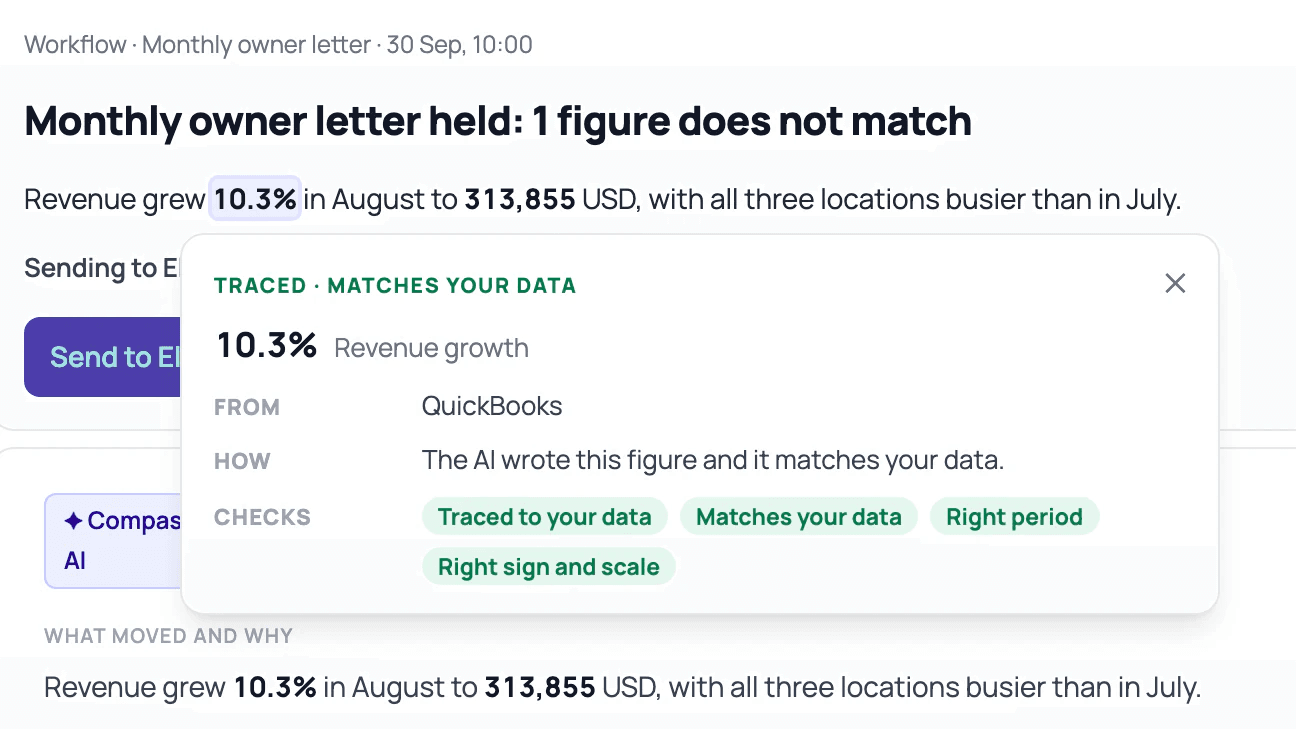
There are limits. A figure Compass can't trace says Not traced, and a check that can't run says why. Compass compares figures with the books and doesn't confirm the books themselves are right, and month-end balances are checked for QuickBooks books only. Whether the advice is right stays with you. See How Checks work for every check, or pricing for plans.
When is checking by hand enough?
Checking by hand is enough for a one-off draft with a few figures for one client, as long as you work through all ten checks and note what you checked. Automate when you send recurring drafts to many clients, when staff or an AI draft for you, or when you need a record that holds up without you in the room.
Frequently asked questions
Which figures in a client report should I check first?
Check percentages and changes first, then anything comparing two periods, then figures from months that aren't closed. Those are where period, sign and scale errors land, and they are the figures clients act on. Totals copied straight from one report carry less risk, since there is no calculation in between, but they still need tracing.
Is it safe to give Claude or ChatGPT a client's financials?
It depends on the tool and the plan, so use only a tool your firm has approved for client data, on terms that keep your inputs out of model training. CPA Ontario's guidance says confidential information shouldn't go into an AI tool unless the environment is verified as secure, and US tax practitioners face penalties under IRC sections 6713 and 7216 for unauthorized disclosure of tax return information. A read-only connection with access scoped to each client limits what the AI can reach.
Do I need to tell clients I used AI?
Check your engagement letters and any rules for your industry or jurisdiction, since some require disclosure. The Journal of Accountancy's July 2026 professional liability column suggests considering AI disclosure language in all engagement letters, even where it isn't required.
Should AI change what I bill?
For federal tax work it can. OPR Alert 2026-19 says billing clients for manual time that AI made unnecessary may breach Circular 230's rule against unconscionable fees. Outside tax practice, the same logic is worth applying when you price AI-assisted work.
What should I do when a figure fails a check?
Find out why before you fix it. A wrong source, period or definition usually means other figures in the draft share the error, so correct the figure from the books, re-run the checks on the whole draft, and note the change. If the mismatch is in the data, such as Stripe disagreeing with the ledger, fix the books first.
Sources
- Eric Y. Kim and Jie Huang. FinRetrieval: A Benchmark for Financial Data Retrieval by AI Agents. Daloopa, January 2026.
- DualEntry. The 2026 Accounting AI Benchmark. 2026.
- Penrose. Can LLMs Do Accounting? (AccountingBench). 2025.
- Yunyu Lin. Thread introducing AccountingBench. 18 July 2025.
- Workday. New Workday Research: Companies Are Leaving AI Gains on the Table. 14 January 2026.
- Virginia Society of CPAs. AI in Practice: VSCPA AI Survey Results. 13 July 2026.
- Nicole L. Graham. Drafting an AI policy that actually works. Journal of Accountancy, 1 July 2026.
- IRS Office of Professional Responsibility. Introductory Guidelines for Responsible AI Use in Federal Tax Practice (OPR Alert 2026-19). 24 June 2026.
- CPA Ontario. The Responsible Use of AI in Professional Practice. 29 June 2026.
- Linas Beliūnas. Turn Claude Sonnet 4.6 Into Financial Analyst That Never Sleeps. Linas's Newsletter, 20 February 2026.